Public API
Ultimate Show your live XP leaderboard, rank ladder and individual member standings on your own website. Your website asks the API and the numbers stay current by themselves, with no exporting. The API is read-only: it can look at your server's XP data and cannot change anything.
Get a key
- 1
Open the dashboard
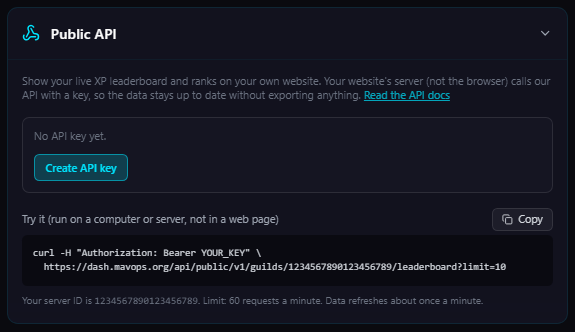
Pick your server and go to the tab with Outgoing Webhooks. The Public API section is below it. - 2
Create an API key
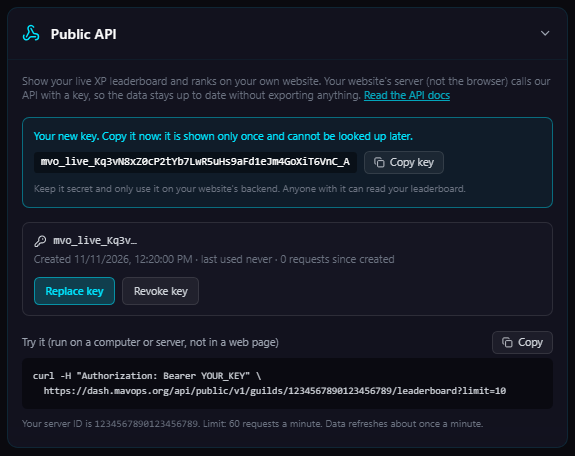
Press Create API key. Copy it straight away: it is shown once and cannot be looked up later. If you lose it, replace it with a new one. - 3
Put it on your website's server
Store it as a secret (for example an environment variable). Do not put it in browser code or a public repository.
Authentication
Send the key in the Authorization header of every request:
Authorization: Bearer mvo_live_xxxxxxxxxxxxxxxxxxxxxxxxxxxxxxxxxxxxxxxxxxx
The API sends no CORS headers on purpose, so a browser will refuse to call it from a web page. Call it from your website's backend (or a serverless function) and pass the result to your page.
Endpoints
Base URL: https://dash.mavops.org/api/public/v1. Replace :guildId with your server's ID (it is also shown in the dashboard's Public API section).
GET /guilds/:guildId/leaderboard
Members with XP, best first. Equal XP shares a position. Members who left the server are not listed. Use limit (1 to 100, default 50) and offset to page through everyone.
{
  "guildId": "123456789012345678",
  "updatedAt": "2026-11-11T10:45:00.000Z",
  "total": 212,
  "limit": 2,
  "offset": 0,
  "members": [
    {
      "position": 1,
      "userId": "300000000000000001",
      "username": "Alice",
      "avatarUrl": "https://cdn.discordapp.com/avatars/300000000000000001/abc123.png?size=128",
      "xp": 5200,
      "level": 52,
      "rank": { "key": "diamond", "name": "Diamond" },
      "lastActive": "2026-11-10T10:00:00Z"
    }
  ]
}
GET /guilds/:guildId/ranks
The rank ladder from Unranked upward with the XP each rank needs, as set up in your server.
{ "ranks": [ { "key": "unranked", "name": "Unranked", "xp": 0 }, { "key": "bronze", "name": "Bronze", "xp": 250 } ] }GET /guilds/:guildId/members/:userId
One member's standing, for a "look up your rank" box. Use the member's Discord user ID.nextRank is null once they hold the top rank.
{
  "member": {
    "position": 4,
    "userId": "300000000000000004",
    "username": "Dave",
    "xp": 300,
    "level": 3,
    "rank": { "key": "bronze", "name": "Bronze" },
    "nextRank": { "key": "silver", "name": "Silver", "xpNeeded": 700 }
  }
}
GET /guilds/:guildId/live
Who is streaming right now, for a "live now" box. It lists members who have linked their Twitch account in your server (with /linktwitch) and are live on Twitch, busiest first. The list is refreshed about every 5 minutes, so a stream can take a few minutes to appear or disappear. Members who have not linked an account, and streams that are only announced through a server's extra channels, are not included. An empty live list just means nobody is live.
{
  "guildId": "123456789012345678",
  "updatedAt": "2026-11-11T21:05:00.000Z",
  "total": 1,
  "live": [
    {
      "userId": "300000000000000001",
      "username": "Alice",
      "avatarUrl": "https://cdn.discordapp.com/avatars/300000000000000001/abc123.png?size=128",
      "platform": "twitch",
      "login": "alice_tv",
      "url": "https://www.twitch.tv/alice_tv",
      "title": "Ranked grind",
      "game": "Valorant",
      "viewers": 9,
      "startedAt": "2026-11-11T20:00:00Z"
    }
  ]
}
Example
// Run this on your website's server (Node 18+), never in browser code.
const res = await fetch(
  "https://dash.mavops.org/api/public/v1/guilds/YOUR_SERVER_ID/leaderboard?limit=25",
  { headers: { Authorization: "Bearer " + process.env.OVERSEER_API_KEY } }
);
if (!res.ok) throw new Error("Overseer API " + res.status);
const { members } = await res.json();
// members[0] = { position, userId, username, avatarUrl, xp, level, rank, lastActive }
Limits and good habits
Each server can make 60 requests a minute. Past that you get a 429 with a Retry-After header. Data is rebuilt about once a minute, so asking more often gains nothing: cache the result on your side for a minute or two and your page will be fast.
Errors
Errors are JSON with an error code and a readable message:missing_key / invalid_key (401), wrong_server / plan_required (403), member_not_found (404), rate_limited (429). If your server leaves the Ultimate plan the key stops working until you upgrade again.