Raid Train
The Raid Train system creates a weekly streaming schedule where community members claim time slots to go live. The bot tracks attendance, awards points based on participation, and enforces no-show penalties to keep the schedule reliable.
How It Works
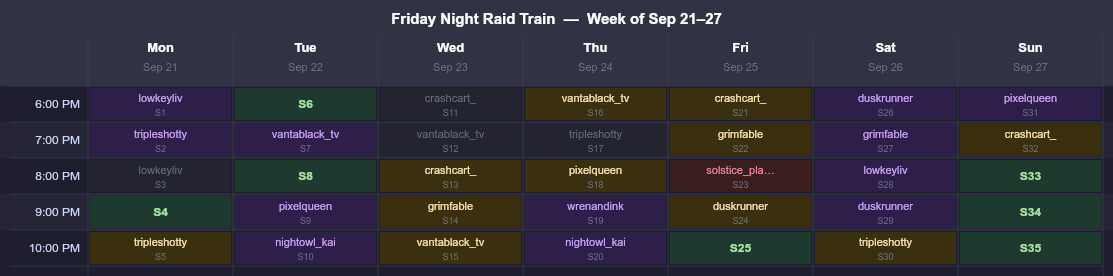
Each week the bot generates a set of open slots (default 24, spread across 4 per day Monday–Sunday). Members claim slots in advance. When a slot's start time arrives, the bot sends a reminder and monitors who shows up — verified by live Twitch tracking. Attendance earns points toward tier progression.
Setting Up a Raid Train
- 1
Create the train
Run/setup raid_train manageas a server admin. A modal lets you name the train, set slot times, choose how many slots per day, and configure your timezone. - 2
Generate the week's slots
The bot auto-generates slots each week. You can trigger it manually with/setup raid_train regenerateor pre-generate next week's slots with/setup raid_train nextweek. - 3
Post the schedule
Use/raidtrain scheduleor the export tool to post the week's schedule as an embed in your channel. Members can see open slots and claim them directly.
Member Commands
All raid train commands have both a full form (/raidtrain claim) and a shorthand alias (/claim):
| Command | Description |
|---|---|
| /raidtrain schedule (/schedule) | View the current week's raid train schedule. |
| /raidtrain claim (/claim) | Claim an open time slot by slot label (e.g. A06). |
| /raidtrain release (/release) | Release a slot you've claimed. |
| /raidtrain waitlist (/waitlist) | Join the waitlist for a full slot. |
| /raidtrain myslots (/myslots) | View your claimed slots and waitlist positions. |
| /raidtrain attendance (/rtattendance) | View your raid train attendance statistics. |
| /raidtrain points (/rtpoints) | View your raid train points, tier, and progress. |
| /raidtrain feedback (/rtfeedback) | Submit feedback about the raid train. |
| /settimezone | Set your timezone so the schedule displays in your local time. |
Claiming a Slot
Each slot has a label (e.g., A06 = Monday 6 AM, B14 = Tuesday 2 PM). Claim with:
If a slot is already taken, join the waitlist:
Attendance & No-Shows
When a slot's start time arrives the bot sends the slot holder a DM reminder. If the member's Twitch account is linked, the bot verifies they're live. Attendance is also tracked by monitoring who is chatting in the stream.
Members who claim a slot and don't show up receive a 48-hour no-show cooldown — they cannot claim new slots until the cooldown expires. Admins can clear this with /setup raid_train clear_noshow.
/setup raid_train slot_ban.Points & Tiers
Members earn raid train points for every slot they attend on time. Points accumulate toward tier progression — higher tiers unlock perks like priority claiming windows (configurable by the server admin).
Viewing Progress
This shows your total points, current tier, and how far you are from the next tier.
Admin Commands
| Command | Description |
|---|---|
| /setup raid_train manage | Create, edit, or delete raid trains. |
| /setup raid_train regenerate | Regenerate open slots for the current week. |
| /setup raid_train nextweek | Pre-generate next week's slots. |
| /setup raid_train override | Force assign, cancel, or mark a slot as no-show. |
| /setup raid_train slot_ban | Permanently ban a member from claiming slots. |
| /setup raid_train slot_unban | Remove a slot ban. |
| /setup raid_train clear_noshow | Clear no-show cooldown globally or for a specific user. |
| /setup raid_train clear_slots | Release claimed slots for the current week or a specific day. |
| /setup raid_train export | Export the schedule as an image or XLSX file. |
| /setup raid_train analytics | View raid train attendance analytics. |
| /setup raid_train override_role | Add/remove roles that can use /override. |
| /currentattendance | Show live chat attendance for the currently running slot. |
| /override | Admin slot override: assign, cancel, or mark no-show. |
/setup raid_train export attach_xlsx:true to generate an Excel file with the full week's schedule — useful for sharing outside of Discord.Multiple Trains
A server can run multiple independent raid trains at the same time (e.g., one for a gaming community and another for an IRL streaming crew). All commands accept an optional train parameter to specify which train you're acting on. If your server has only one train, this parameter can be omitted.